
Connect a datasheet tool to ChatGPT (with screenshots)
Updated 2026-10-12
Unlike Claude, ChatGPT doesn't open with a single button: you add it once yourself on the Plugins page. It takes about five minutes. Click the red-outlined spots in the screenshots, in order. (The screenshots show the Korean interface; the buttons sit in the same places in English.)
Add it (once)
1. Open ChatGPT's Plugins page with the button below (new window). At the top right, choose Add → Add custom MCP server.
Open ChatGPT's Plugins page ↗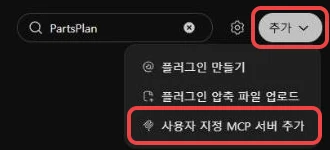
2. Enter PartsPlan as the name and the URL below as the server URL. Leave authentication as OAuth. Tick 'I understand and want to continue' and click Create as a plugin.
https://worker.partsplanai.com/mcp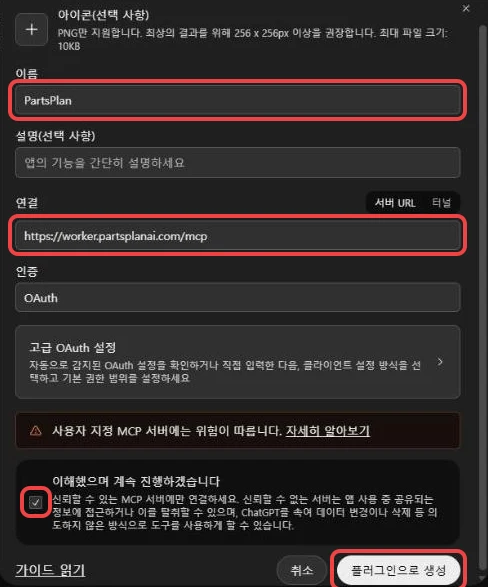
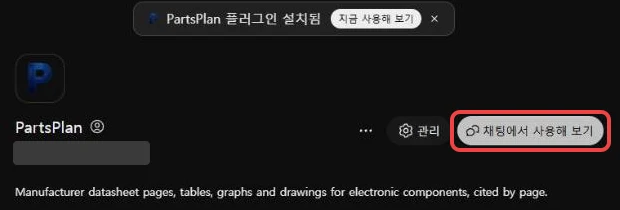
3. On the new PartsPlan page, click Install plugin.
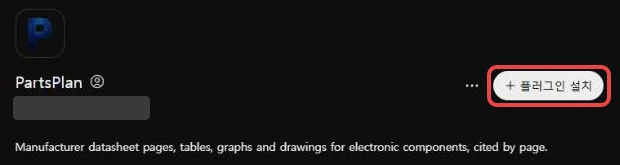
4. A new window opens with the PartsPlan sign-in and permission page. If you don't have an account, sign up there (free, no card). Sign in and click Allow at the bottom.
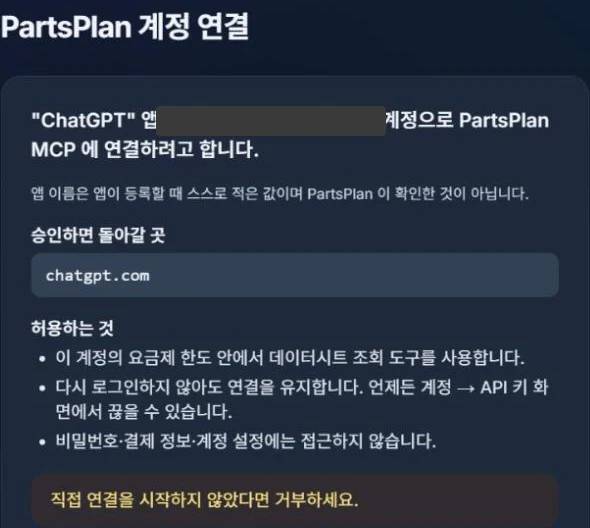
5. When 'PartsPlan plugin installed' appears, you're done. Try it in chat opens a conversation with PartsPlan turned on.
Use it in a chat
1. Type @Parts in the message box; PartsPlan appears below. Click it to pick it (typing the full @partsplan works too).

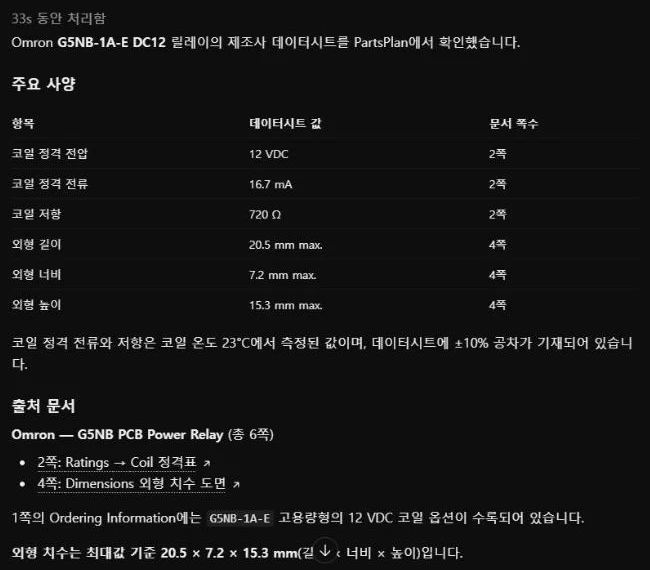
2. With PartsPlan attached at the front of the message box, ask your question. Give the part number and ask for the document and page number too, and you get the cited page. Attach PartsPlan this way at the start of each new chat.

Answers come back with the document and page number.
If ChatGPT answers without using PartsPlan, put @PartsPlan in front of the question or ask again with 'look it up in the datasheet with PartsPlan'.
If it doesn't work
- No 'Add custom MCP server' in the Add menu: the feature may be turned off for your plan or your workspace settings. On a company account, ask your admin to allow it.
- 'An app with the same name already exists': you have already added it. Search for PartsPlan on the Plugins page, open it and click Install plugin.
- The permission window doesn't open: allow pop-ups for chatgpt.com and click Install plugin again.
- To disconnect: on the PartsPlan plugin page choose ··· → Remove. You can also disconnect from PartsPlan under Account → API keys.
How much you can use for free
The free plan includes 300 calls a month (up to 100 a day) with no card required. BOM checks are free up to 200 lines a day. For more, see the plans.